Self-Hosting a Tangled Knot Using Clan and NixOS


I attended a workshop on Tangled at NixCon 2026. Tangled is a code forge that federates over ATProto. That means you can self-host your own instance while maintaining the social aspect of walled garden forges like GitHub. A Knot is one of the parts you can self-host and acts as the headless git server.
I also attended sessions on Clan at NixCon. Clan is a peer-to-peer computer management framework for NixOS. It lets you fully provision a remote machine in a declarative way.
I've wanted to try both out for a while and they looked like they would fit together very well because both are built around Nix.
I recently set up a Clan machine using PXE boot so I have a perfect place to test out a Tangled Knot.
The process wasn't hard. I just had to:
- Create a machine specific configuration file.
- Configure networking pieces.
- Use Clan Vars to generate the Knot server master key.
- Configure the Knot service.
- Register the Knot on Tangled.
Before I did that, though, I had to decide which Tangled Knot version to use.
Tangled Knot v1 and v2
Tangled has an official self-hosting guide. However, there are two implementations of the Knot server. The NixOS section of the guide points to the Nix configuration variables for services.tangled.knot. This is the v1 Knot server.
Knot 2 is the second implementation of Knots for Tangled and was released in August. Tangled has a migration guide for those already running a v1 Knot.
The new server is written in Rust and the options live under services.tangled.knot-rs. The benefits of v2 are:
- No longer requires a SQLite database and stores everything in git itself.
- SSH is served in-process, which simplifies the configuration setup and SSH key handling.
- Integrates with proxies to handle rate limiting.
I didn't see any reason to start up a new Knot that is v1, so I went with a v2 Knot.
Where to put the Knot configuration?
I already had a Clan machine set up. If you do not, have a look at the Clan's quick start guide.
When you initially set up a machine with Clan you will only make changes in your clan.nix file. That file handles Clan services, which are Clan specific modules that involve multiple machines.
For my Knot I needed to set up a machine specific configuration. Clan will automatically detect files on the path machines/<machine name>/configuration.nix. As a starting point I used:
{
  inputs,
  config,
  pkgs,
  ...
}:
{


}
I also added clan.core.networking.buildHost = "localhost" since the machine is low power and would take a while to build. This option lets me build on my desktop and push the build to the node.
Caddy, Firewall and SSH Ports
The Knot 2 readme says, "Give the knot port 22 if one can." So I moved SSH to port 2200. Additionally, TLS and a reverse proxy are required to run a Knot. I used Caddy to provide both:
  services.openssh.ports = [ 2200 ];

  services.caddy = {
    enable = true;
    virtualHosts."knot.example.com".extraConfig = ''
      reverse_proxy 127.0.0.1:5555
    '';
  };

  networking.firewall.allowedTCPPorts = [
    80
    443
  ];
I also had to open up the firewall ports for HTTP/HTTPS. Setting services.openssh.ports automatically handled opening port 2200.
After I ran clan machines update, I added settings.port to roles.default.machines in my clan.nix. That way the Clan CLI could still reach the machine after changing the SSH port:
roles.default.machines."machine" = {
        settings.host = "192.0.2.10";
        settings.user = "root";
        settings.port = 2200;
      };
Knot master key
Tangled Knots have a master key that is used to seal the signing keys for the repositories. The documentation gives this example for generating the master key:
sudo install -d -o git -g git /var/lib/knot
sudo install -d -m 700 /etc/knot
printf 'KNOT_MASTER_KEY=%s\n' "$(openssl rand -base64 32)" | sudo tee /etc/knot/knot.env > /dev/null
sudo chmod 600 /etc/knot/knot.env
Clan has a functionality called Vars for managing secrets. You can define your own generators for vars. This is how I used Clan vars instead of the example above to generate the master key:
clan.core.vars.generators.knot = {
 files."knot.env".restartUnits = [ "knot-rs.service" ];
 runtimeInputs = [ pkgs.openssl ];
 script = ''
   printf 'KNOT_MASTER_KEY=%s\n' "$(openssl rand -base64 32)" > "$out"/knot.env
 '';
};
This reuses printf 'KNOT_MASTER_KEY=%s\n' "$(openssl rand -base64 32)". Instead of writing the master key to knot.env in /etc, the key is written into $out, which is then encrypted with Vars. Additionally, the expression restarts the service when the file is updated.
Configure the Knot Service
This is about as minimal a service config as I could put together:
  imports = [
    inputs.tangled.nixosModules.knot-rs
  ];

  services.tangled.knot-rs = {
    enable = true;
    environmentFile = config.clan.core.vars.generators.knot.files."knot.env".path;
    settings = {
      server = {
        hostname = "knot.example.com";
        admins = [ "did:plc:<your DID from the Tangled website>" ];
        ssh_listen_addr = "[::]:22";
      };
      atproto.plc_directory = "https://plc.directory";
      xrpc = {
        trusted_proxy_header = "x-forwarded-for";
        trusted_proxies = [
          "127.0.0.1"
          "::1"
        ];
      };
    };
  };

  clan.core.state.knot.folders = [ "/var/lib/knot" ];
knot-rs required adding inputs.tangled.url = "git+https://tangled.org/tangled.org/core" to my flake as an input.
Walking through the service settings:
environmentFile- knots use a master key to seal the repository signing keys. I used Clan Vars to handle generating the environment variable file with the master key.settings.server.hostname- the host name for the knot server.settings.server.admins- a list of ATProto Decentralized Identifiers (DIDs) of the admin users. I got my own DID from https://tangled.org/settings/profile.settings.server.ssh_listen_addr- by default Knot v2 uses port 2222 for SSH. The Tangled website only generates clone URLs for git with port 22. The documentation suggests setting this to port 22 if you can do so.settings.atproto.plc_directory- this option was intentionally created with no default value so that you have to make a choice.xrpc- Because the knot is behind Caddy, I needed to set the headers so rate limiting can tell which user is which.
Note that settings.server.git.object_format defaults to "sha256". This can't be changed after creating the Knot. I went with the default value.
Finally, clan.core.state.knot.folders specifies where Clan stores state. Clan can handle backups which I'm not going to cover here, but works off this state directory information.
Add the Knot to your Tangled Account
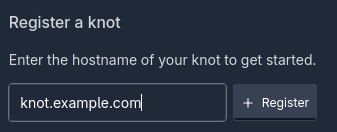
Then I just had to go to my knot settings on Tangled and enter my server in "Register a knot":
At first the site will say the Knot is unverified:

Since the DID I set in my configuration through KNOT_SERVER_OWNER matches the DID on my Tangled account, the badge should eventually change to show Verified:
That's all it takes to have a federated Knot up and running on your own hardware. You can start creating repos through the app view at tangled.org and pushing code.
Also, if you're interested, Tangled now also lets you self-host Spindles for CI runners. Stay tuned for more.
No spam, no sharing to third party. Only you and me.

Member discussion