Hello Walter! Learning Rust on ESP32
The story so far
I am trying to make an embedded device to scan cell towers, BLE devices, wifi access points and log everything with their GPS positions. The goal is to submit the information to BeaconDB, and have a fused location provider that works without depending on Google.
I don't have a background in hardware or embedded devices though so I've been bootstrapping my knowledge. First I started doing HackerBoxes's monthly kits to learn the basics. In HackerBox 0118 More Human I messed around with BLE and WiFi scanning using Arduino. Then in HackerBox 0119 Geopositioning I tried out using a GNSS with an ESP32 to get location. After that I set up some BLE beacons around my house to learn about how they work. All of this came together in a prototype franken project gluing together a bunch of Arduino example code.
The plan was always to rewrite the prototype, but I'm only getting there now after finally trying to learn Rust. I've wanted to use the wonderful Embassy framework for embedded Rust development, but none of my boards were supported. That is, until now.
About the Walter
I recently saw the Walter devboard on Crowd Supply and realized the board has essentially everything I need:
- An ESP32-S3 - good toolchain support for ESP-IDF and Embassy. Also, has hardware for both bluetooth and wifi.
- Sequans GM02SP modem which can handle both the cell tower scanning and the GNSS positioning. [1]
- Low power.
In comparison, I actually bought an ESP32-s3 and a GNSS quite a while ago, but they have been sitting in a box because:
- I was still working my way through some Rust practice books.
- I didn't yet have a modem I could use for checking cell towers.
- The project felt daunting.
Now, the Walter is $77 before shipping. This costs more than the ESP32-S3, and bare GNSS chip, but starts to get more competitive when you include the cost of a modem. Plus, the Walter gives me a nice platform to start learning about rust dev on in a low friction way.
The plan
Speaking of low friction, this time I'm going to do several smaller posts as I go, to keep the writing overhead down. Roughly the idea is to work on:
- Getting Embassy running on the board (this post)
- BLE Scanning
- WiFi Scanning
- Cell Tower Scanning
- Location and Time
- Saving to SD Card
Both BLE and wifi scanning should be pretty easy since there are good examples of the Embassy libraries available. Working with the modem is after that since it involves learning about UART for communication. Finally, saving to an SD card is not hard, but thinking about how I want to encode everything will be easier when I have the context from the other pieces.
All these little pieces are also why Embassy feels like a good fit for this project. Several kinds of scans will all operate at once and that would be pretty ugly on something like Arduino. [2] While async Rust may not be beloved, this is the exact use case for it and Embassy is an async framework.
Setting up the dev environment on NixOS
TL;DR ESP32-S3 dev setup is not turn key yet, but doable.
If you go on the NixOS wiki and look at the rust page, you will learn about the oxalica/rust-overlay which helps create nice clean development flakes. However, the overlay uses the official rust channels, which do not support the Xtensa toolchain needed for the esp32-s3. It also seems that the overlay cannot be modified to work with the forked toolchain yet. There is an issue tracking the work to upstream the compiler on LLVM.
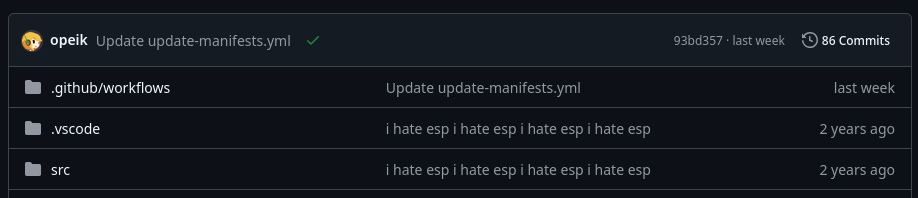
So the only choice left is to use a FHS environment with espup. There are several projects on Github to do this, but I couldn't get any of them to work. This is understandable as the tooling changes so frequently. Have a look at the commit messages on opeik/rust-overlay-esp as an example:
After a couple days of trying out various projects, I opted instead to make this absolutely cursed flake with the help of Claude Code:
{
  description = "ESP32-S3 Rust dev environment";

  inputs = {
    nixpkgs.url = "github:nixos/nixpkgs/nixos-unstable";
    flake-utils = {
      url = "github:numtide/flake-utils";
      inputs.nixpkgs.follows = "nixpkgs";
    };
  };

  outputs = { self, nixpkgs, flake-utils, ... }:
    flake-utils.lib.eachDefaultSystem (system:
      let
        pkgs = import nixpkgs {
          inherit system;
          config.allowUnfree = true;
        };
      in {
        devShell = (pkgs.buildFHSEnv {
          name = "esp-rust-env";

          targetPkgs = pkgs: with pkgs; [
            # rustup manages the actual Rust + esp toolchain
            rustup

            # ESP tooling
            espup
            espflash
            esp-generate

            # probe-rs for flashing/debugging
            probe-rs-tools

            # Build dependencies
            openssl
            openssl.dev
            pkg-config

            # C compiler and native libs needed for build scripts and espup binaries
            gcc
            stdenv.cc.cc.lib   # libstdc++
            zlib

            # IDE
            rust-analyzer
            jetbrains.rust-rover
          ];

          profile = ''
            export RUST_SRC_PATH="$HOME/.rustup/toolchains/esp/lib/rustlib/src/rust/library"
            export DEFMT_LOG="info"
            if [ -f "$HOME/export-esp.sh" ]; then
              source "$HOME/export-esp.sh"
            fi
          '';

          runScript = "bash";
        }).env;
      }
    );
}
I am OK using GenAI for this part. Making a working flake is the kind of friction that often kills my interest in projects.
After running nix develop I ran the following commands once to set up the tool chains:
rustup toolchain install stable
espup install
This will unfortunately create files in your home directory which is not the nix way.
Booting Embassy on the Walter
I mostly followed the starting a new project section from the Embassy book and used esp-generate to set up the project. In HackerBox 0119 - Geopositioning the Tiny Yeti Locator board was based off the ESP32 Marauder board. That uses a ESP-WROOM-32 which is not supported by the Rust HAL. So esp-generate did not allow me to enable wifi or BLE.
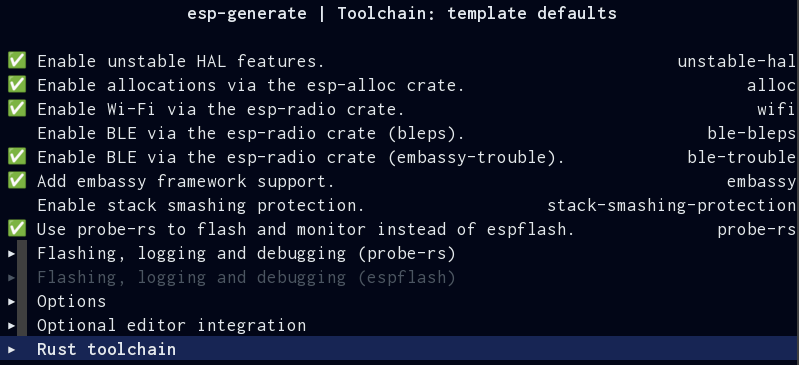
Thankfully with the Walter I was able to configure everything I needed. Based on the book's recommendations I used embassy-trouble rather than bleps for BLE, defmt for printing messages and probe-rs instead of espflash for flashing:
When I tried to flash the project to my board with cargo run --release the flash kept failing and I saw the warning WARN probe_rs::probe::list::linux: The 'plugdev' group does not exist. I had to add the following to my NixOS config:
  users.groups.plugdev = {}; # need to make explicitly

  users.users.ciferkey = {
    isNormalUser = true;
    description = "ciferkey";
    extraGroups = [
      "dialout" # Allow access to serial device
      "plugdev" # For esp32 flashing
    ];
  };

  services = {
    udev = {
      packages = with pkgs; [
        probe-rs-tools
      ];
    };
  };
Essentially three parts are needed:
- I needed to add my user to the plugdev group.
- This does not actually create the group, so the group has to be setup explicitly.
- I had to enable the udev service for
probe-rs-toolsto access the USB device.
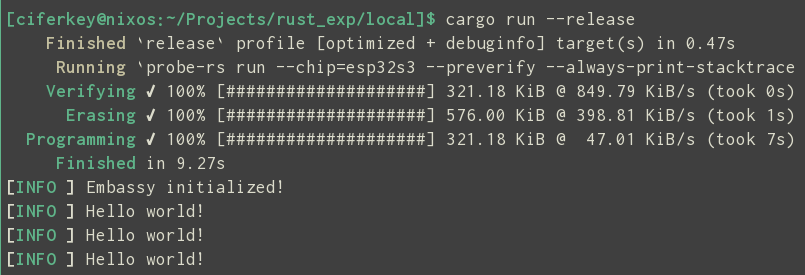
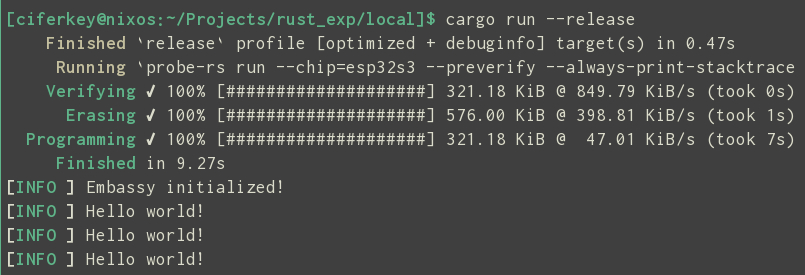
With that in place I was able to flash and get Hello World! over serial:
Keeping the momentum going
Finally getting something running on the board felt so encouraging! As I lamented in I never thought I could be a maker, I'm late to trying out hardware. Thankfully with this project I have a nice little roadmap I can follow to scale up my understanding about embedded Rust development.
Who knows, after I get all the software pieces in place I might try my hand at wiring everything up with a battery and learning how to draft a case in FreeCAD.
There are also some precertified antennas. ↩︎
I will say though, there is good zephyr support, and if you want something like Arduino you might want to learn that instead. ↩︎
Member discussion